Reject malformed RSA DNSKEY data before reading the extended exponent
header, and add a regression test.

Co-developed-by: GitHub Copilot (GPT 5.5) <copilot@github.com>
If this runs on a slow or busy machine, then we may not get enough
pressure to trigger the event sources. In such case, the test does not
finish. It is problematic when the test is _not_ run with 'meson test',
e.g. debian/ubuntu CIs.

Let's introduce a timeout for each event loop, and skip test cases
gracefully.
I got infos from product_name:

$ cat /sys/class/dmi/id/product_name
X+ Piccolo

Turns out the modalias has a little difference:

$ cat /sys/class/dmi/id/modalias
dmi:bvnAmericanMegatrendsInternational,LLC.:bvr5.27:bd09/10/2025:br5.27:svnX-Plus.tech:pnX+Piccolo:pvrDefaultstring:rvnX-Plus:rnXPLUS-SERIES81x-DEV:rvrDefaultstring:cvnDefaultstring:ct10:cvrDefaultstring:skuSeries81x:pfaPiccoloSeries:

So let's remove the extra space. Crossing fingers... 🤞

Fixes: 033be1a41b
When rename_netif() failed for a reason other than -EBUSY (e.g. -EEXIST
because NAME= conflicts with an existing interface), the revert path
rewrote the on-disk udev database from dev_db_clone (the pre-rules
snapshot) and then returned the error. The caller in
udev_event_execute_rules() bailed out before reaching the final
device_update_db(dev), so every property the rules had attached to the
device during this event (including ENV{}= assignments made alongside
the failing NAME=) was silently dropped from /run/udev/data/.

Persist 'dev' from inside the revert block, after its syspath and
INTERFACE have been restored. The cloned snapshot is still written
first to clear ID_RENAMING/ID_PROCESSING; the subsequent dev write
keeps the rule-applied properties without resurrecting the new name.
Only persist when r < 0, since the -EBUSY path returns success and the
caller will write the DB itself.

Add a TEST-17-UDEV.rename-netif regression test that pre-creates the
rename target, then triggers rules that set three ENV{}= properties
(one on a rule line before the failing NAME=, one on the same line as
NAME=, and one on a rule line after) and asserts all three are still
visible via udevadm info on the source interface. The neighbouring
test_netif_renaming_conflict already exercises the same -EEXIST revert
path but only checks the SYSTEMD_ALIAS broadcast, which is why this
regression went unnoticed.

Verified against unpatched origin/main (b4aff10ac0): the new test
fails, udevadm reports only kernel-supplied fields for the source
interface, and /run/udev/data/n<ifindex> is 0 bytes. With this patch
applied all three properties survive regardless of whether they were
set before, on, or after the failing NAME= rule line.

Downstream impact (NetworkManager managing an interface that rules had
marked NM_UNMANAGED=1): https://redhat.atlassian.net/browse/RHEL-178481

Fixes: https://github.com/systemd/systemd/issues/42331

Co-developed-by: Claude Opus 4.7 <noreply@anthropic.com>
This reverts commit 62e17483aa.

The failure should be caused by PATH_TEST() macro introduced by
fc7a32df38 and QMP_TEST() macro by
742733440f, and now they are dropped.
The workaround should not be necessary anymore.
Similar to the previous commit for test-path.
The macro confuses gcc/gcov/lcov:
```
lcov: ERROR: lcov: ERROR: (inconsistent) mismatched end line for test_qmp_client_basic_body at
/home/runner/work/systemd/systemd/src/test/test-qmp-client.c:204:
204 -> 224 while capturing from build/mkosi.builddir/arch~rolling~x86-64/test-qmp-client.p/src_test_test-qmp-client.c.gcno
```

The macro itself is not bad, but does not reduce lines so much.
Let's stop using the macro.
The macro was introduced by fc7a32df38,
but unfortunately gcc/gcov/lcov are confused by the macro:
```
lcov: ERROR: lcov: ERROR: (inconsistent) mismatched end line for test_path_exists_body at
/home/runner/work/systemd/systemd/src/test/test-path.c:158:
158 -> 185 while capturing from build/mkosi.builddir/arch~rolling~x86-64/test-path.p/src_test_test-path.c.gcno
(use "lcov --ignore-errors inconsistent ..." to bypass this error)
```

The macro deos nothing spurious, hence it should be a bug in gcc.
But, the macro just reduces the lines for calling setup_test(), and
does not simplify test cases so much.
Let's call it in each test cases, and stop using the macro.
Unit-level Condition…= / Assert…= directives that fail prevent activation
entirely, so SuccessAction= / FailureAction= never fire. An ExecCondition=
skip in [Service] runs as part of the activation transition itself, so
the unit goes active → inactive and SuccessAction= is honored.

This asymmetry has tripped users up; document it explicitly in both
systemd.service(5) (ExecCondition= section) and systemd.unit(5)
(SuccessAction= / FailureAction= section) with cross-references.

Fixes: https://github.com/systemd/systemd/issues/42035

Co-developed-by: Claude Opus 4.7 <noreply@anthropic.com>
It has been failing for a few days:

```
lcov: ERROR: lcov: ERROR: (inconsistent) mismatched end line for test_path_exists_body at /home/runner/work/systemd/systemd/src/test/test-path.c:158: 158 -> 185 while capturing from build/mkosi.builddir/arch~rolling~x86-64/test-path.p/src_test_test-path.c.gcno
	(use "lcov --ignore-errors inconsistent ..." to bypass this error)
```
The systemd-oomd-defaults rpm installed on Fedora/CentOS images via
mkosi/mkosi.conf.d/centos-fedora/mkosi.conf ships
/usr/lib/systemd/system/system.slice.d/10-oomd-per-slice-defaults.conf:

    [Slice]
    ManagedOOMMemoryPressure=kill
    ManagedOOMMemoryPressureLimit=80%

https://gitlab.com/redhat/centos-stream/rpms/systemd/-/blob/c10s/10-oomd-per-slice-defaults.conf

In a recent flaky CI run on centos-10, the following sequence was
recorded in test/journal/TEST-55-OOMD-1.journal:

    [   77.740597] systemd-oomd[659]: Memory pressure for /system.slice is 85.03% > 80.00% for > 2s with reclaim activity
    [   77.745326] TEST-55-OOMD.sh[1292]: + journalctl --sync
    [   77.749125] systemd-oomd[659]: Considered 19 cgroups for killing, top candidates were:
    [   77.749128] systemd-oomd[659]:         Path: /system.slice/systemd-journald.service
    [   77.749134] systemd-oomd[659]:                 Current Memory Usage: 55.5M
    [   77.749597] systemd-oomd[659]: oomd attempting to kill 407 with KILL
    [   77.749670] systemd-oomd[659]: Marked /system.slice/systemd-journald.service for killing due to memory pressure for /system.slice being 85.03% > 80.00% for > 2s with reclaim activity
    [   77.752252] systemd[1]: systemd-journald.service: systemd-oomd killed 1 process(es) in this unit.
    [   77.752293] systemd[1]: systemd-journald.service: Changed running -> stop-sigterm
    [  329.922401] systemd[1]: systemd-journald.service: Main process exited, code=killed, status=9/KILL

PID 1292 (the test script) never logged anything after the
`journalctl --sync` line at [77.745326], and the unit stayed in
stop-sigterm until [329.922401].

Override /system.slice to ManagedOOMMemoryPressure=auto in the test
setup so the test does not rely on whichever per-slice oomd defaults
the distro happens to ship.

Co-developed-by: Claude Opus 4.7 <noreply@anthropic.com>
lcov: ERROR: lcov: ERROR: (inconsistent) mismatched end line for test_path_exists_body at /home/runner/work/systemd/systemd/src/test/test-path.c:158: 158 -> 185 while capturing from build/mkosi.builddir/arch~rolling~x86-64/test-path.p/src_test_test-path.c.gcno
	(use "lcov --ignore-errors inconsistent ..." to bypass this error)
Other places that read credentials filer out ENXIO:
$ journalctl -b -u systemd-imds-early-network.service -o short-monotonic --no-hostname --no-pager -p warning
[    5.477675] systemd-imdsd[473]: Failed to read credential 'imds.vendor', ignoring: No such device or address
[    5.477687] systemd-imdsd[473]: Failed to read credential 'imds.vendor_token', ignoring: No such device or address
[    5.477693] systemd-imdsd[473]: Failed to read credential 'imds.refresh_header_name', ignoring: No such device or address
[    5.477699] systemd-imdsd[473]: Failed to read credential 'imds.data_url', ignoring: No such device or address
[    5.477704] systemd-imdsd[473]: Failed to read credential 'imds.data_url_suffix', ignoring: No such device or address
[    5.477710] systemd-imdsd[473]: Failed to read credential 'imds.token_header_name', ignoring: No such device or address
[    5.477714] systemd-imdsd[473]: Failed to read credential 'imds.extra_header', ignoring: No such device or address
[    5.477720] systemd-imdsd[473]: Failed to read credential 'imds.extra_header2', ignoring: No such device or address
[    5.477730] systemd-imdsd[473]: Failed to read credential 'imds.extra_header3', ignoring: No such device or address
[    5.477736] systemd-imdsd[473]: Failed to read credential 'imds.extra_header4', ignoring: No such device or address
[    5.477742] systemd-imdsd[473]: Failed to read credential 'imds.extra_header5', ignoring: No such device or address
[    5.477747] systemd-imdsd[473]: Failed to read credential 'imds.extra_header6', ignoring: No such device or address
[    5.477751] systemd-imdsd[473]: Failed to read credential 'imds.extra_header7', ignoring: No such device or address
[    5.477757] systemd-imdsd[473]: Failed to read credential 'imds.extra_header8', ignoring: No such device or address
[    5.477763] systemd-imdsd[473]: Failed to read credential 'imds.extra_header9', ignoring: No such device or address
[    5.477768] systemd-imdsd[473]: Failed to read credential 'imds.extra_header10', ignoring: No such device or address
[    5.477774] systemd-imdsd[473]: Failed to read credential 'imds.extra_header11', ignoring: No such device or address
[    5.477779] systemd-imdsd[473]: Failed to read credential 'imds.extra_header12', ignoring: No such device or address
[    5.477784] systemd-imdsd[473]: Failed to read credential 'imds.extra_header13', ignoring: No such device or address
[    5.477789] systemd-imdsd[473]: Failed to read credential 'imds.extra_header14', ignoring: No such device or address
[    5.477799] systemd-imdsd[473]: Failed to read credential 'imds.extra_header15', ignoring: No such device or address
[    5.477804] systemd-imdsd[473]: Failed to read credential 'imds.extra_header16', ignoring: No such device or address
[    5.477810] systemd-imdsd[473]: Failed to read credential 'imds.extra_header17', ignoring: No such device or address
[    5.477815] systemd-imdsd[473]: Failed to read credential 'imds.extra_header18', ignoring: No such device or address
[    5.477820] systemd-imdsd[473]: Failed to read credential 'imds.extra_header19', ignoring: No such device or address
[    5.477825] systemd-imdsd[473]: Failed to read credential 'imds.extra_header20', ignoring: No such device or address
[    5.477830] systemd-imdsd[473]: Failed to read credential 'imds.extra_header21', ignoring: No such device or address
[    5.477835] systemd-imdsd[473]: Failed to read credential 'imds.extra_header22', ignoring: No such device or address
[    5.477840] systemd-imdsd[473]: Failed to read credential 'imds.extra_header23', ignoring: No such device or address
[    5.477845] systemd-imdsd[473]: Failed to read credential 'imds.extra_header24', ignoring: No such device or address
[    5.477851] systemd-imdsd[473]: Failed to read credential 'imds.extra_header25', ignoring: No such device or address
[    5.477856] systemd-imdsd[473]: Failed to read credential 'imds.extra_header26', ignoring: No such device or address
[    5.477865] systemd-imdsd[473]: Failed to read credential 'imds.extra_header27', ignoring: No such device or address
[    5.477869] systemd-imdsd[473]: Failed to read credential 'imds.extra_header28', ignoring: No such device or address
[    5.477874] systemd-imdsd[473]: Failed to read credential 'imds.extra_header29', ignoring: No such device or address
[    5.477881] systemd-imdsd[473]: Failed to read credential 'imds.extra_header30', ignoring: No such device or address
[    5.477885] systemd-imdsd[473]: Failed to read credential 'imds.extra_header31', ignoring: No such device or address
[    5.477890] systemd-imdsd[473]: Failed to read credential 'imds.extra_header32', ignoring: No such device or address
[    5.477896] systemd-imdsd[473]: Failed to read credential 'imds.extra_header33', ignoring: No such device or address
[    5.477901] systemd-imdsd[473]: Failed to read credential 'imds.extra_header34', ignoring: No such device or address
[    5.477906] systemd-imdsd[473]: Failed to read credential 'imds.extra_header35', ignoring: No such device or address
[    5.477913] systemd-imdsd[473]: Failed to read credential 'imds.extra_header36', ignoring: No such device or address
[    5.477917] systemd-imdsd[473]: Failed to read credential 'imds.extra_header37', ignoring: No such device or address
[    5.477922] systemd-imdsd[473]: Failed to read credential 'imds.extra_header38', ignoring: No such device or address
[    5.477931] systemd-imdsd[473]: Failed to read credential 'imds.extra_header39', ignoring: No such device or address
[    5.477935] systemd-imdsd[473]: Failed to read credential 'imds.extra_header40', ignoring: No such device or address
[    5.477940] systemd-imdsd[473]: Failed to read credential 'imds.extra_header41', ignoring: No such device or address
[    5.477945] systemd-imdsd[473]: Failed to read credential 'imds.extra_header42', ignoring: No such device or address
[    5.477951] systemd-imdsd[473]: Failed to read credential 'imds.extra_header43', ignoring: No such device or address
[    5.477956] systemd-imdsd[473]: Failed to read credential 'imds.extra_header44', ignoring: No such device or address
[    5.477962] systemd-imdsd[473]: Failed to read credential 'imds.extra_header45', ignoring: No such device or address
[    5.477967] systemd-imdsd[473]: Failed to read credential 'imds.extra_header46', ignoring: No such device or address
[    5.477972] systemd-imdsd[473]: Failed to read credential 'imds.extra_header47', ignoring: No such device or address
[    5.477978] systemd-imdsd[473]: Failed to read credential 'imds.extra_header48', ignoring: No such device or address
[    5.477982] systemd-imdsd[473]: Failed to read credential 'imds.extra_header49', ignoring: No such device or address
[    5.477988] systemd-imdsd[473]: Failed to read credential 'imds.extra_header50', ignoring: No such device or address
[    5.477995] systemd-imdsd[473]: Failed to read credential 'imds.extra_header51', ignoring: No such device or address
[    5.477999] systemd-imdsd[473]: Failed to read credential 'imds.extra_header52', ignoring: No such device or address
[    5.478022] systemd-imdsd[473]: Failed to read credential 'imds.extra_header53', ignoring: No such device or address
[    5.478028] systemd-imdsd[473]: Failed to read credential 'imds.extra_header54', ignoring: No such device or address
[    5.478033] systemd-imdsd[473]: Failed to read credential 'imds.extra_header55', ignoring: No such device or address
[    5.478039] systemd-imdsd[473]: Failed to read credential 'imds.extra_header56', ignoring: No such device or address
[    5.478044] systemd-imdsd[473]: Failed to read credential 'imds.extra_header57', ignoring: No such device or address
[    5.478050] systemd-imdsd[473]: Failed to read credential 'imds.extra_header58', ignoring: No such device or address
[    5.478055] systemd-imdsd[473]: Failed to read credential 'imds.extra_header59', ignoring: No such device or address
[    5.478060] systemd-imdsd[473]: Failed to read credential 'imds.extra_header60', ignoring: No such device or address
[    5.478066] systemd-imdsd[473]: Failed to read credential 'imds.extra_header61', ignoring: No such device or address
[    5.478071] systemd-imdsd[473]: Failed to read credential 'imds.extra_header62', ignoring: No such device or address
[    5.478079] systemd-imdsd[473]: Failed to read credential 'imds.extra_header63', ignoring: No such device or address
[    5.478086] systemd-imdsd[473]: Failed read IPv4 address from credential 'imds.address_ipv4', ignoring: No such device or address
[    5.478091] systemd-imdsd[473]: Failed read IPv6 address from credential 'imds.address_ipv6', ignoring: No such device or address
[    5.478097] systemd-imdsd[473]: Failed to read credential 'imds.key_hostname', ignoring: No such device or address
[    5.478102] systemd-imdsd[473]: Failed to read credential 'imds.key_region', ignoring: No such device or address
[    5.478107] systemd-imdsd[473]: Failed to read credential 'imds.key_zone', ignoring: No such device or address
[    5.478113] systemd-imdsd[473]: Failed to read credential 'imds.key_ipv4_public', ignoring: No such device or address
[    5.478119] systemd-imdsd[473]: Failed to read credential 'imds.key_ipv6_public', ignoring: No such device or address
[    5.478123] systemd-imdsd[473]: Failed to read credential 'imds.key_ssh_key', ignoring: No such device or address
[    5.478128] systemd-imdsd[473]: Failed to read credential 'imds.key_userdata', ignoring: No such device or address
[    5.478134] systemd-imdsd[473]: Failed to read credential 'imds.key_userdata_base', ignoring: No such device or address
[    5.478137] systemd-imdsd[473]: Failed to read credential 'imds.key_userdata_base64', ignoring: No such device or address
In https://bugzilla.redhat.com/show_bug.cgi?id=2481466, it is reported
that systemd-imds-early-network.service fails on AWS EC2 instance with:

> No IMDS endpoint information provided or detected, cannot operate.

The service will be started on various systems where it doesn't have
enough configuration to run. The systemd-imds-generator only does some
superficial checks, so the tool should not mark the boot as failed
it turns out that IMDS is not supported.
Since a62cd5a153, when an invalid property
is being added, device_add_property() refuses it with -EINVAL.
Before the commit, the function could fail with only -ENOMEM, and if it fails,
processing udev rules was aborted.
Let's not hard fail when udev rules or udev builtins try to add an invalid
property, and let's just log and ignore the failure.
Follow-up for a62cd5a153.
Fixes#41339 and #41296.
* 9cb09470c9 Version 261~rc1
* 7d16ad00bd Fix compilation with openssl 4.0
* 3770fa7c92 Revert "Use dlopen-notes to automatically generate library Recommends/Requires/Suggests"
* 8b3d1726f5 Add back various explit Requires
* d8abb91805 Drop scriptlet workarounds for upgrades from versions < 247
* ee6d0b9d27 Use dlopen-notes to automatically generate library Recommends/Requires/Suggests
* 32a2038627 spec: drop duplicated line
* ab743db0fe Downgrade kbd dependency to Recommends
* 400494ada4 Update conditionals for RHEL 11
This test often fails because the VM reboots (eg: kernel panic) and the
previous state is left unclean. Do the cleanups at the beginning too,
to try and reduce flakiness.
After looking at the unit, I'm not sure if systemd-imds-import.service
is supposed to run in the host system or not. But if it is supposed to
only run in the initrd, then the static condition in the unit file gives
as the worst behaviour: the generator does not do any checks if we are
in the initrd or not, and if it enabled the unit, it'll influence the
transaction ordering (possibly causing loops or additional work) and
then the unit will be unconditionally skipped. So replace the static
condition by a check in the generator. If the user specifies
systemd.imds.import on the commandline, it'll be honoured also in the
host.
The imds services are (very-) early boot services, ordered before
sysinit.target. OTOH, network-online.target is something that is often
established very late [1]. In fact, we always recommended to _not_
depend on it for things that are ordered before the usual targets that
allow user logins (e.g. graphical.target). So we certainly cannot add
early-boot ordering for it. Currently systemd-imds-imports.service
is conditionalized to only run in the initrd. But if the unit is enabled
in the host system, it would affect the transaction there, so we should
drop this bogus ordering everywhere.

(I think this might have been added by mistake. After all,
systemd-imds-import.service itself shouldn't care about the network.)

This fixes boot ordering issues reported upstream and in Fedora [2, 3].

[1] https://systemd.io/NETWORK_ONLINE/#network-connectivity-has-been-established-network-onlinetarget
[2] https://github.com/systemd/systemd/pull/40980#discussion_r2949473028
[3] https://bugzilla.redhat.com/show_bug.cgi?id=2481304
This reverts commit a17efef137 ("test: try to detect SIGILL in stress-ng
and skip TEST-55-OOMD gracefully") and replaces it with a single
check to skip the test cases.

The previous check was not reliable as stress-ng can catch SIGILL
itself and exist with an error:

  stress-ng[1068]: stress-ng: debug: [1068] caught SIGILL, address \
    0x00005632f8330140 (ILL_ILLOPN)
  stress-ng[1068]: stress-ng: debug: [1068] stress-ng: info: \
    0x00005632f8330140:<62>71 fd 48 6f 2d 36 14 1c 00 c5 d1 ef ed 49 29
  ...
  stress-ng[1053]: stress-ng: error: [1053] vm: [1061] terminated \
    with an error, exit status=2 (stressor failed)
  ...
  systemd[1]: TEST-55-OOMD-slowrule.service: Main process exited, \
    code=exited, status=2/INVALIDARGUMENT
  systemd[1]: TEST-55-OOMD-slowrule.service: Failed with result \
    'exit-code'.

Try to detect at the beginning of the test and skip the test case if it
happens.
di is allocated while iterating over p.partitions. If the array is
empty,
the loop is skipped and di remains NULL, but the code still assigns
image
metadata through it.

Return EBADMSG before accessing di in this case.

Found by Linux Verification Center (linuxtesting.org) with Svace.
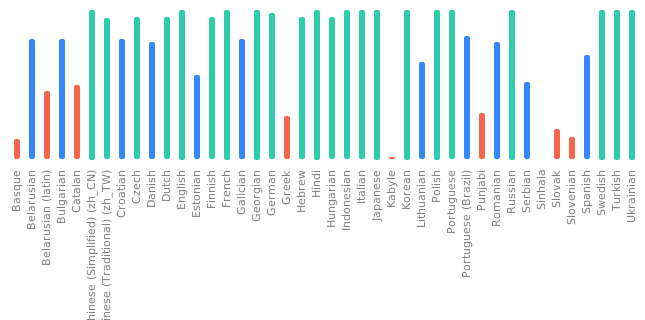
 Luca Boccassi
 Yu Watanabe
 Christian Hesse
 Chris Patterson
 Frantisek Sumsal
 Martin Srebotnjak
 Priit Jõerüüt
 Henri Aunin
 Zbigniew Jędrzejewski-Szmek
 Rocker Zhang
 nikstur
 Mikhail Nogin
 Daan De Meyer
 naly zzwd
 Ali Ciloglu
 Fco. Javier F. Serrador